

Behavior-Driven Data Engineering in Databricks with Gherkin and Genie Code
Summary
As tools like Genie Code have increased in understanding and capabilities, vibe coding data engineering pipelines is seeing a great increase in productivity. Ongoing maintenance of vibe-coded code may be very difficult. Using feature specifications written in Gherkin ensures a more deterministic and maintainable code generation process.
Introduction
Feature stories originated as a way for business users and developers to define the behaviors software should have, a practice known as behavior driven development. Along the way these became more detailed specifications, and the language was formalized into Gherkin with its GIVEN...WHEN...THEN syntax. Gherkin specifications are popular for behavior driven testing. There were some efforts to use operational code generators with Gherkin feature specs, but early code generators were not very good.
With the advent of LLMs and coding agents (especially Genie Code), I began to wonder how well Gherkin could be used for generating data engineering code. Turns out Genie Code is fantastic at both producing and using Gherkin feature specs to generate data engineering pipelines.
The development process is to write a clear Gherkin spec first, either ourselves or "vibe writing" it, and then having Genie Code generate code from the spec. Genie Code should never create code without a spec. Every code iteration starts by updating the specs and then generating code.
Why use specifications instead of just vibe coding? Long conversations get compressed, and over time lose a lot of context, especially the small decisions. Also, conversations live where--your individual coding agent? What if someone else on your team has to pick up the feature again, they can't read the chat. Specs live in source control, along with the code. Specs serve as both the documentation and a conversation history of sorts. Specs make the maintenance process faster, cheaper, and more accurate.
If you're not familiar with feature specs look like, here's an example from https://cucumber.io/docs/bdd/better-gherkin:
Feature: Subscribers see different articles based on their subscription level

Scenario: Free subscribers see only the free articles
  Given Free Frieda has a free subscription
  When Free Frieda logs in with her valid credentials
  Then she sees a Free article

Scenario: Subscriber with a paid subscription can access both free and paid articles
  Given Paid Patty has a basic-level paid subscription
  When Paid Patty logs in with her valid credentials
  Then she sees a Free article and a Paid article
A complete application will have many, many specs covering all of its behaviors and features. In this example, the login feature and the subscription status feature are not part of this spec, they are defined by other features; they support this feature, but are different ones. This style is very high-level, and data egineers should probably use smaller, more detiled specs. A high-level feature for us might read:
Feature: Process counter data into metrics for our dashboard

Scenario: Load the data from daily files
    Given a volume of data files generated daily
    When new files arrive
    Then only the new files are loaded into Bronze tables
That's not bad, but it leaves a lot to chance, so we should probably add some more detail to ensure consistency:
Feature: Process counter data into metrics for our dashboard

Scenario: Load the data from daily files
    Given a volume of data files generated daily
    When new files arrive
    Then only the new files are loaded into bronze.telemetry.counters
Being explicit about the table keeps our code generator from making up different table names, or getting confused about which table we want to use, the next time it generates code.
We can have more than one Scenario in a spec--for example, maybe we have more than one type of data.
Feature: Process counter data into metrics for our dashboard

Scenario: Load the counters data from daily files
    Given a volume of data files generated daily
    When new files arrive
    And are named like "counters-*.csv"
    Then only the new files are loaded into bronze.telemetry.counters

Scenario: Load the spooling data from daily files
    Given a volume of data files generated daily
    When new files arrive
    And are named like "spooling-*.csv"
    Then only the new files are loaded into bronze.telemetry.spooling
Figuring out exactly how to write good specs to guide Genie Code will take a little experimentation, so let's experiment.
Start by creating an empty ETL pipeline (Jobs & Pipelines >> ETL Pipeline). Switch view from Pipeline to All files, and add a regular folder named "specs". Be careful not to add a source code folder, specs aren't source code, this is just a regular folder.
Have Genie Code add a claude.md to the pipeline root, this will be used to store the instructions of how Genie Code should behave. Have Genie Code add its first instruction:
Update CLAUDE.md with this directive: "We will be using Gherkin feature specs to describe the ETL code you need to generate. The specs are the source of truth, do not make code changes without first updating the spec. In some cases the user will update the spec manually and tell you to regenerate the code. If you are asked to write the spec do not generate any code until the spec has been reviewed."
And then set the spec path:
update claude.md to note that specs should be saved in the specs folder
We'll generate specs interactively with Genie Code to start. This is a bit of a "choose your own adventure" when you write specs with Genie Code. While preparing this blog post I've had different outcomes and suggestions each time.
In this example, we'll use the sample NYC Taxi data, and our analysis will be to see when and where we should pre-stage taxis. There are two flaws in the sample NYC Taxi data:
- ZIP Codes are stored as INT, but they should be STRING since they can start with 0. We'll have to fix this by left-padding to five characters with 0
- Times are stored with an offset of +00:00, which usually indicates UTC. That's a fine way for storing and communicating time, but it's not the local time where the trips were made. We want our final output to use Americas/New_York.
For our first spec iteration (samples >> silver), we'll pad the ZIP Codes
for this project we'll use samples.nyctaxi.trips as our bronze source. Our silver target will be silver.nyctaxi.trips_cleaned, and our gold will be gold.nyctaxi.trips_metrics
For our silver transformation, pickup_zip and dropoff_zip should be strings, left-padded with 0 to five characters length.
Genie will suggest a spec for the silver transformations, and it may include some gold metrics specs, too. Read the spec over, see if you like it. If you do, have Genie generate the pipeline code and run it. Then experiment some more by updating the spec again.
Feature: NYC Taxi Trips Cleansing and Metrics
  As a data analyst
  I want taxi trip data cleansed and aggregated
  So that I can analyze daily trip metrics by pickup location

  Scenario: Zip codes are zero-padded to five characters
    Given the source table samples.nyctaxi.trips has pickup_zip and dropoff_zip as integers
    When the silver transformation processes the data
    Then pickup_zip should be a string left-padded with zeros to 5 characters
    And dropoff_zip should be a string left-padded with zeros to 5 characters
    And all other columns should be passed through unchanged
Here is the silver transformation generated from the spec above:
from pyspark import pipelines as dp
from pyspark.sql import functions as F


@dp.table(
    name="silver.nyctaxi.trips_cleaned",
    comment="Cleansed NYC taxi trips with zero-padded zip codes",
)
def trips_cleaned():
    return (
        spark.readStream.table("samples.nyctaxi.trips")
        .withColumn(
            "pickup_zip",
            F.lpad(F.col("pickup_zip").cast("string"), 5, "0"),
        )
        .withColumn(
            "dropoff_zip",
            F.lpad(F.col("dropoff_zip").cast("string"), 5, "0"),
        )
    )
For our gold metrics, we'll also an instruction to convert the timestamps to Eastern Time (for brevity I'm skipping the iteration where we made the gold metrics but it was the same process).
the times in the source data are stored as UTC, and we want to convert these to Eastern Time in the gold table.
Genie suggests an update spec for the gold transformation:
Scenario: Daily metrics are aggregated by trip date and pickup zip
    Given the silver table silver.nyctaxi.trips_cleaned has cleansed trip records
    When the gold transformation processes the data
    Then the result should be grouped by trip_date and pickup_zip
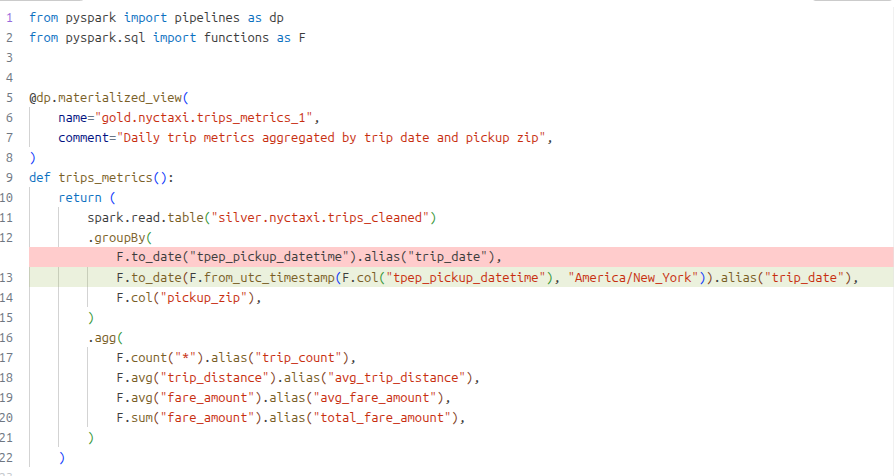
    And trip_date should be derived from tpep_pickup_datetime converted from UTC to America/New_York
    And each group should include trip_count, avg_trip_distance, avg_fare_amount, and total_fare_amount
And updates the code with a sugested diff.
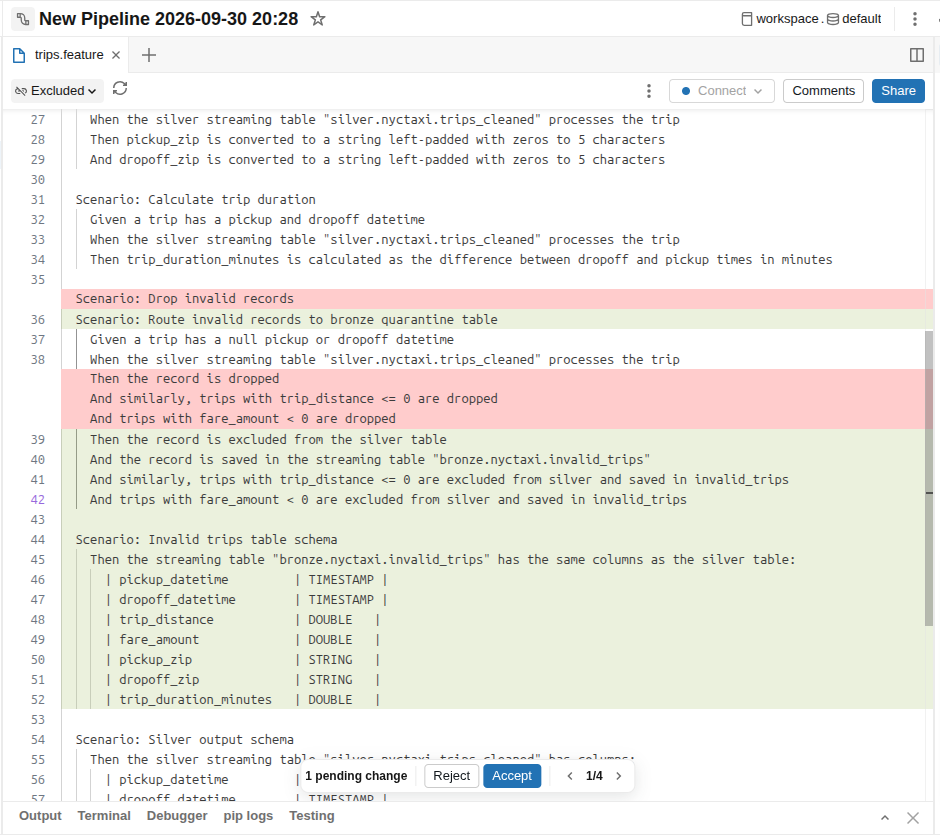
Genie Code sometimes adds idea of its own. For example, one of the scenarios Genie Code added on its own was to drop invalid records:
Scenario: Drop invalid records Given a trip has a null pickup or dropoff datetime When the silver streaming table "silver.nyctaxi.trips_cleaned" processes the trip Then the record is dropped And similarly, trips with trip_distance <= 0 are dropped And trips with fare_amount < 0 are dropped
It's OK if Genie Code does not suggest dropping invalid records in your early experiments, just instruct it to do so. I've run through this example 4 or 5 times preparing this blog post and Genie Code is starting to develop a memory based on what we've done in previous trials.
Rather than drop the records, I'd like to save them in an invalid_trips table. Instruct Genie Code to do this, and Genie Code will suggest a diff which we can accept if we like it.
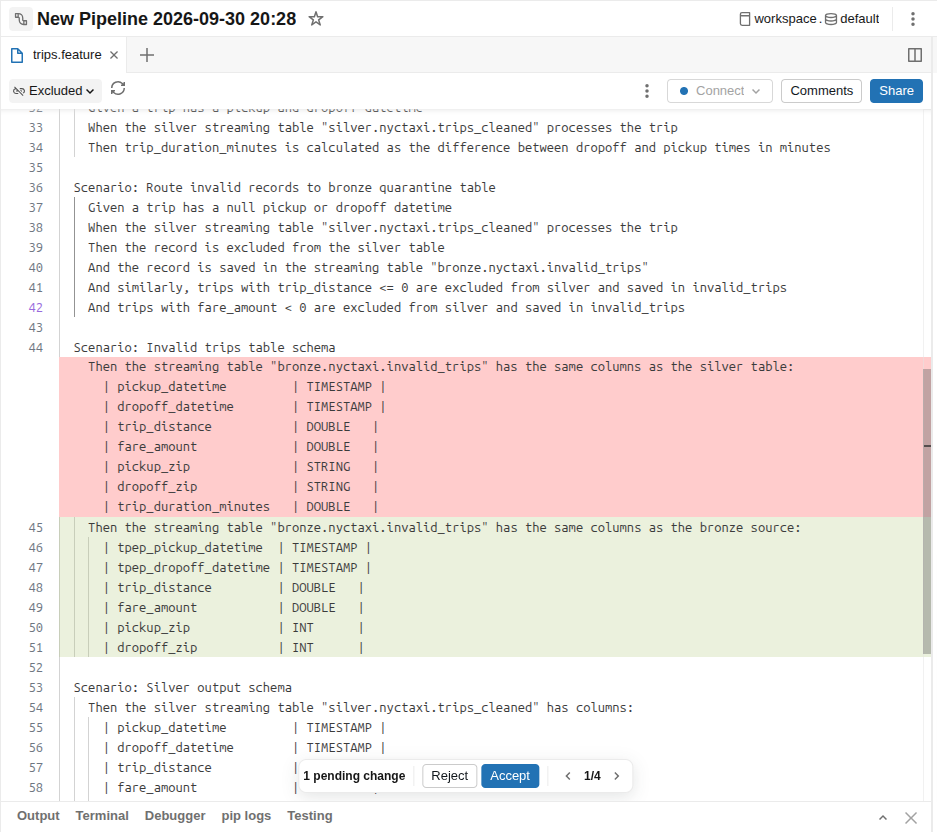
When reviewing the spec, I caught a bug--the quarrantine table should have the same columns as the source table, not the silver table. Have Genie Code fix this. Reviewing the spec just saved us some time and hassle having to debug and re-do the code generation.
At the end of a few minutes' work we have both a spec and code with bronze>silver and silver>gold transformations, with handling for invalid records. An example spec I generated can be reviewed at https://gist.github.com/rjdudley/2c01d5910a2f645747783e34aa4ded1b, and the generated silver transformation can be seen at https://gist.github.com/rjdudley/e63a25b96bed9cbd2cfa7ee04c7ce934. More importantly, we have a very maintainable feature spec and the ability to easily regerate parts of our pipeline.
Success tip
I've found it's best to start simple and add to the spec. You can regenerate the ETL code as often as you want and run the code as many times as you want. Iterating a few small changes at a time keeps the process simple.
But wait, there's more!
This is the first in a series of blog posts I am planning. Subsequent posts will look at how we can use these same specs to generate sythetic datasets for our testing, and then generating tests as well.
Interested in a user group talk?
If your user group would like to see a presentation, let me know. If you're close I'll come over in person, otherwise we can set up a video conference. My socials are linked under the menu to the right.